
Learn how to use PATCH and FORALL + PATCH in Power Apps with SharePoint. Step-by-step guide including scenario, sample data, People column handling, input/output, and performance tips.
The Core Difference: Iteration vs. Single Record
At its heart, the difference between these two methods lies in how they handle multiple records.
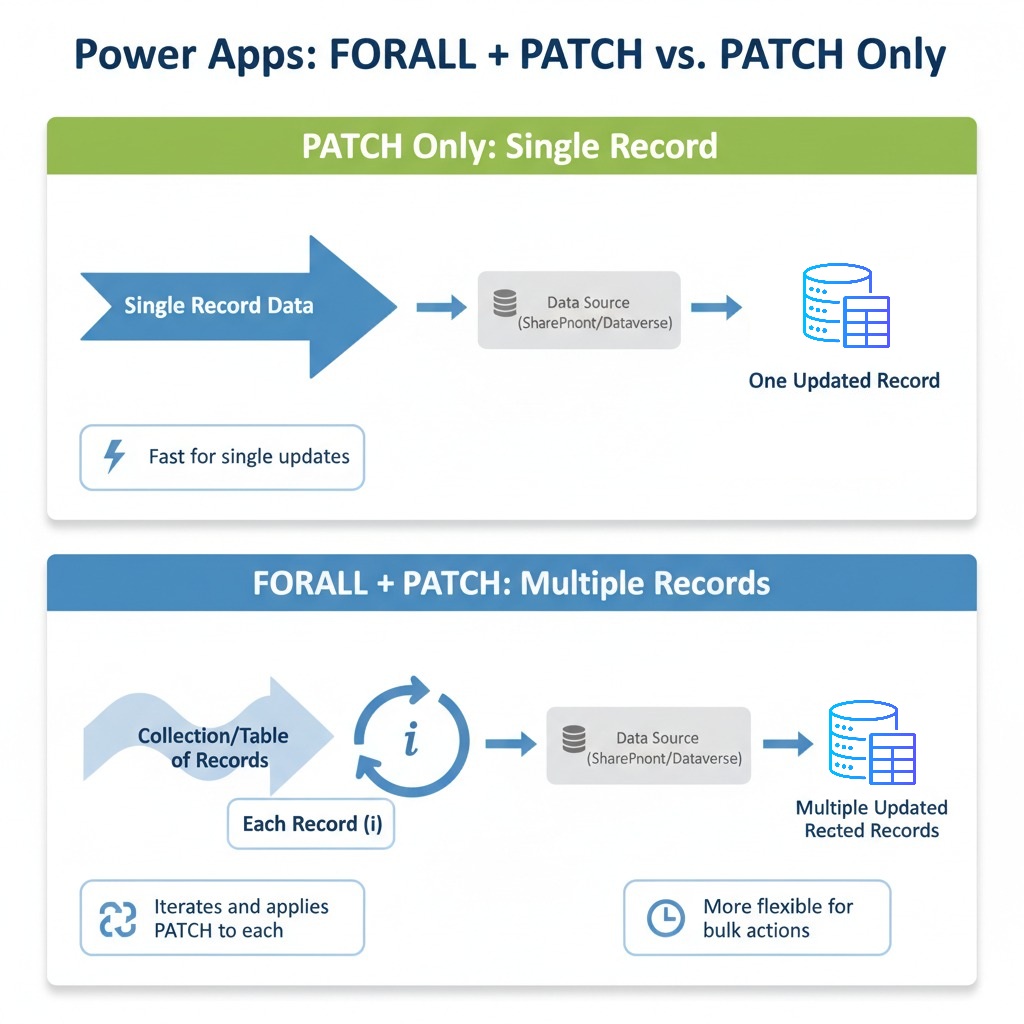
- PATCH Only: This function is designed to create or update a single record in a data source. You provide the data source, the base record to update (if updating an existing one), and the changes you want to apply.
- FORALL + PATCH: The FORALL function is an iteration function. It allows you to process each record in a table individually. When combined with PATCH, it means you can iterate through a collection or a filtered set of records and apply PATCH operations to each one, either updating existing records or creating new ones.
- Introduction
- Key Functions in Power Apps
- Scenario & Data Structure
- Add Single Record (PATCH only)
- Bulk Add Employees (FORALL + PATCH)
- Update Single Employee (PATCH only)
- Bulk Update Employees (FORALL + PATCH)
- Handling People Column
- Best Practices & Common Mistakes
1️⃣ Introduction
Power Apps enables low-code solutions for data insertion, updates, and bulk operations. Choosing the right method is critical for performance and scalability. In this guide, we will explore:
- PATCH only – for single record operations
- FORALL + PATCH – for bulk operations
- Handling People columns in SharePoint or User/Lookup columns in Dataverse
We will demonstrate step-by-step examples with sample data, input, and expected outputs.
2️⃣ Key Functions in Power Apps
2.1 PATCH
PATCH is used to create or update a record in any data source (SharePoint, Dataverse, SQL, etc.) without requiring the entire form.
Patch(DataSource, BaseRecord, ChangeRecord)Example:
Patch(
    Employees,
    Defaults(Employees),
    {Title: "David Lee", Department: "Finance"}
)Defaults(Employees)creates a new record{Title: "David Lee", Department: "Finance"}updates fields
2.2 FORALL
FORALL loops through a collection and performs an action (like PATCH) for each record. It is ideal for bulk operations.
ForAll(Collection, Action)Example:
ForAll(
    colNewEmployees,
    Patch(
        Employees,
        Defaults(Employees),
        {Title: Name, Department: Department}
    )
)- Loops through
colNewEmployees - Creates a new record for each employee
2.3 Defaults
Defaults provides a template of default values for a new record in a data source. Usually used with PATCH to create new records.
Defaults(DataSource)Example:
Patch(
    Employees,
    Defaults(Employees),
    {Title: "Emma Brown", Department: "IT"}
)
3️⃣ Scenario & Data Structure
Create a SharePoint List – Employees with the following schema and data:
| Column Name | Type | Notes |
|---|---|---|
| Title | Single line of text | Employee Name |
| Department | Choice | HR, IT, Sales, Finance |
| Manager | Person or Group | People column |
| ID | Number (Auto) | Unique identifier |
Add Data:
| ID | Title | Department | Manager |
|---|---|---|---|
| 101 | Alice Smith | HR | John Doe |
| 102 | Bob Johnson | IT | Jane Smith |
4️⃣ Add Single Record (PATCH only)
Adding a new employee/task into SharePoint
Patch(
    Employees,
    Defaults(Employees),
    {
        Title: txtName.Text,
        Department: ddlDepartment.Selected.Value,
        Manager: {
            '@odata.type': "#Microsoft.Azure.Connectors.SharePoint.SPListExpandedUser",
            Claims: "i:0#.f|membership|" & txtManager.Selected.Mail,
            DisplayName: txtManager.Selected.DisplayName,
            Email: txtManager.Selected.Mail
        }
    }
)
Input Example:
- Name: David Lee
- Department: Finance
- Manager: david.manager@company.com
In SharePoint, a new records will be added:
| ID | Title | Department | Manager |
|---|---|---|---|
| 103 | David Lee | Finance | David Manager |
5️⃣ Bulk Add Employees (FORALL + PATCH)
Lets assume, we need to add the following details into SharePoint List – New Employees, present in the collection: (colNewEmployees)
| Name | Department | Manager (Mail, DisplayName) |
|---|---|---|
| David Lee | Finance | David.Lee@company.com, David Lee |
| Emma Brown | IT | emma.brown@company.com, Emma Brown |
ForAll(
    colNewEmployees,
    Patch(
        Employees,
        Defaults(Employees),
        {
            Title: Name,
            Department: Department,
            Manager: {
                '@odata.type': "#Microsoft.Azure.Connectors.SharePoint.SPListExpandedUser",
                Claims: "i:0#.f|membership|" & Manager.Mail,
                DisplayName: Manager.DisplayName,
                Email: Manager.Mail
            }
        }
    )
)
6️⃣ Update Single Employee (PATCH only)
Update one existing employee record (ID=101) with new department and manager.
Patch(
    Employees,
    LookUp(Employees, ID = 101),
    {
        Department: ddlDepartment.Selected.Value,
        Manager: {
            '@odata.type': "#Microsoft.Azure.Connectors.SharePoint.SPListExpandedUser",
            Claims: "i:0#.f|membership|" & txtManager.Selected.Mail,
            DisplayName: txtManager.Selected.DisplayName,
            Email: txtManager.Selected.Mail
        }
    }
)
Updates the existing SharePoint with following Output:
| ID | Title | Department | Manager |
|---|---|---|---|
| 101 | Alice Smith | Finance | John Doe |
7️⃣ Bulk Update Employees (FORALL + PATCH)
Consider that we want to update the following details to the collection: colUpdateEmployees
| ID | Department | Manager (Mail, DisplayName) |
|---|---|---|
| 101 | Finance | john.doe@company.com, John Doe |
| 102 | HR | jane.smith@company.com, Jane Smith |
Loop through colUpdateEmployees to update multiple existing records.
ForAll(
    colUpdateEmployees,
    Patch(
        Employees,
        LookUp(Employees, ID = ThisRecord.ID),
        {
            Department: ThisRecord.Department,
            Manager: {
                '@odata.type': "#Microsoft.Azure.Connectors.SharePoint.SPListExpandedUser",
                Claims: "i:0#.f|membership|" & ThisRecord.Manager.Mail,
                DisplayName: ThisRecord.Manager.DisplayName,
                Email: ThisRecord.Manager.Mail
            }
        }
    )
)
Updates the existing SharePoint with following Output:
| ID | Title | Department | Manager |
|---|---|---|---|
| 101 | Alice Smith | Finance | John Doe |
| 102 | Bob Johnson | HR | Jane Smith |
Key point: When updating existing records with FORALL + PATCH, you need to ensure PATCH knows which record to update. LookUp is often used within ForAll to retrieve the full record from the data source that matches the current iterated item.
8️⃣ Handling People Column
- Must include Claims, DisplayName, Email
- Always reference a valid SharePoint user
- Use LookUp/Selected from combo boxes for dynamic assignment
9️⃣ Best Practices & Common Mistakes
- Forgetting Defaults() with New Records: When adding new records with PATCH, always use Defaults(DataSourceName) as the second argument. This creates a blank record ready to be populated.
- Incorrect Column Names: Data source column names can be case-sensitive or have different display names than their internal names (especially in Dataverse). Always double-check!
- Missing LookUp for Updates in FORALL: If you’re iterating through a collection that doesn’t contain the full data source record (e.g., just IDs), you’ll need to use LookUp(DataSource, IDColumn = ThisRecord.ID) inside the PATCH to correctly target the record in your data source.
- Batching Too Many Records: While FORALL is powerful, pushing thousands of records at once can lead to performance issues or timeouts. Consider breaking large updates into smaller batches if feasible, or relying on server-side flows (Power Automate) for truly massive operations.
- Not Handling People Columns Correctly: As seen above, SharePoint and Dataverse handle people columns differently. Ensure you’re providing the correct record structure.
- Confusing ThisRecord and Parent: Within FORALL, ThisRecord refers to the current record being processed in the iteration. Make sure you’re using it correctly to access properties of the iterated item.

 Learning By Doing | Unlocking Power Platform
Leave a comment